Free resume import
Upload and update your existing resume online
Import the file you have into a free editor. Review every field, then keep editing.
Upload a PDF, DOCX, DOC, RTF or image of your current resume. The importer turns it into editable sections without rewriting your text, keeps your employers, titles and dates wherever they can be read reliably, and opens the free editor. No account needed to start, nothing to retype from scratch, and you review every field before you continue.
Upload your resume
Drag & drop your resume here
Supported: PDF, DOCX, DOC, RTF, PNG, JPG, JPEG — Max 10MB
The importer does not rewrite your text. You review every field before anything else happens.
No file to upload? Create a resume for free
What the importer keeps
Your existing content, organised into editable fields
The importer does not rewrite your resume. It extracts the text it can recognise and sorts it into the sections the editor uses. Here is one role from the sample resume used on this page, before and after a real import.
Operations Coordinator, Harbourline Logistics
March 2021 - Present
- Coordinated inbound deliveries for three regional depots.
- Introduced a shared booking sheet that cut missed delivery slots.
- Trained new coordinators on the booking process.
Job title
Operations Coordinator
Employer
Harbourline Logistics
Start Date
March 2021
End Date
Not detected. Check this field.
Achievements
- Coordinated inbound deliveries for three regional depots.
- Introduced a shared booking sheet that cut missed delivery slots.
- Trained new coordinators on the booking process.
Name, contact details, links and summary
Job titles, employers and dates
Recognised achievement bullets, ready to review
Education, skills, languages and certifications
Dates, two-column layouts, scans, skill lists and certifications are the usual places to check after import. The file coverage notes below say what to look for.
How it works
From file to editable resume in three steps
Upload, preview, continue. The editor opens with your resume in a template you can change at any time.
Import · Preview before you continue
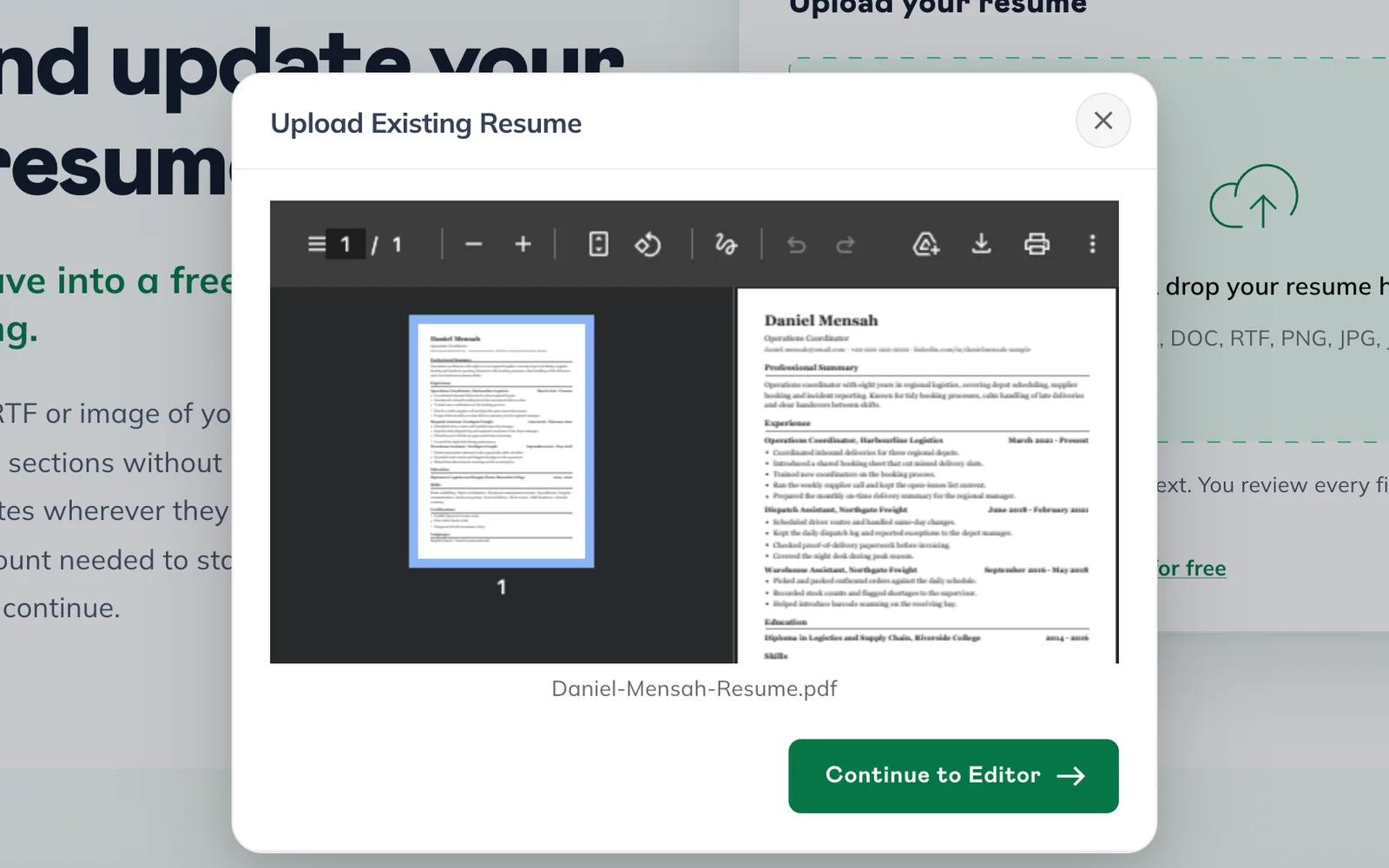
Upload and preview
Drop the file in the box above. You see a preview of the file and a Continue to Editor button, so the wrong file never goes further.
The importer extracts your sections
Contact details, summary, experience, education, skills, languages and certifications land in their own fields. The text is not rewritten.
Edit, pick a template, download
The resume opens in the free editor in the default template. Switch templates, fix anything the import missed, and download the PDF free.
After the import
Everything the free editor offers, starting from your real resume
You keep working with the content you brought. The AI tools act only on your resume and the information you provide, and ask for the facts they are missing before they write.
Resume editor · Imported resume
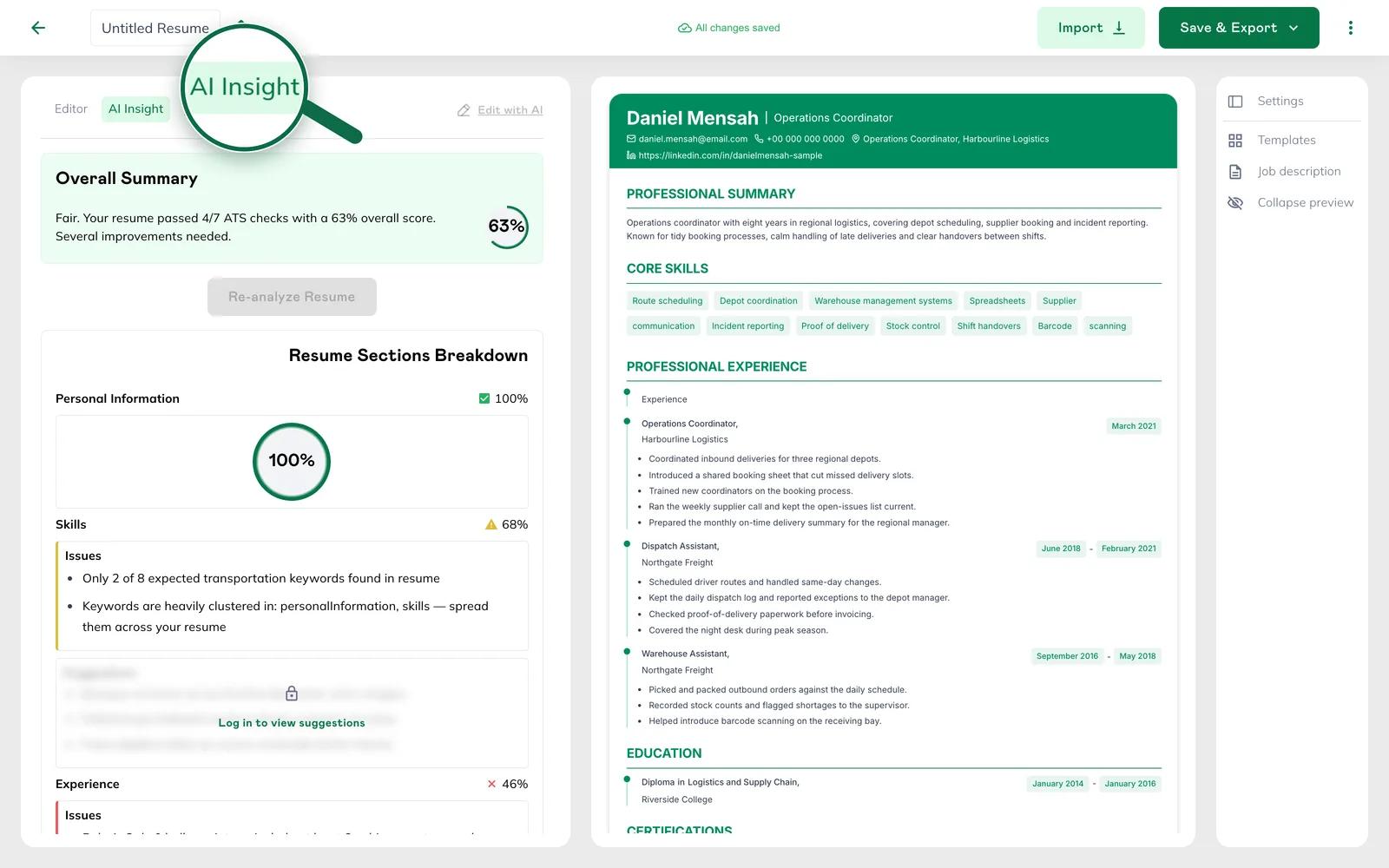
Unedited result of importing the sample resume used on this page, with the AI Insight tab open. It also shows why dates and multiword skills are worth checking.
See the first analysis
AI Insight runs seven checks on the imported resume: layout, section completeness, contact details, chronology, keyword match, bullet impact and spelling. The first analysis runs automatically after import. Running it again after your edits depends on your plan.
See how the ATS check worksFix one line with a prompt
Pick a bullet, describe the change in your own words, and review the result beside the original. Nothing is saved until you accept it.
Check it against a job
Paste a job description and Job Match shows which requirements the resume covers and which it does not.
See how the match is scoredSwitch templates and download
Switch templates without losing content; some templates need a paid plan. Download the PDF free from your account.
When the AI improves a line, it asks for the number, the tool or the outcome instead of inventing one.
Another way in
Want it rewritten with you, line by line?
The AI resume writer takes the same upload and works through it in a conversation: it asks about the weak lines, writes from your answers and shows every change beside the chat. Pay once, no account needed.
File coverage
What imports cleanly, and what to check afterwards
Honest notes from the importer. Anything it misses can be corrected in the editor.
DOCX and text-based PDF files
The most reliable input. Headings, bullets and dates map straight into fields.
Single-column layouts
Sections are read top to bottom in the order you wrote them.
Multi-page resumes
Multi-page files are supported. Check that every role and bullet was captured.
Scanned pages and photos
PNG and JPG files are read with text recognition first. Check names, dates and email addresses for misread characters.
Two-column and table layouts
Columns can be read across instead of down, so check that each bullet sits under the right role.
Icons, charts and text inside images
Decorative elements are dropped. Skill bars and rating icons have no text to keep, so add those skills by hand.
The rules
What the import does and does not do
The same rules that apply to every AI feature in the editor apply here. Your evidence is the only source.
Nothing is rewritten
The import copies your text into fields. Rewording only happens when you ask the editor to do it, and you review the result before it is saved.
Nothing is invented
The AI tools in the editor are instructed not to add metrics, employers, titles, dates, tools, certifications, degrees or outcomes you did not supply. When a line needs one, they ask.
Update it again later
Open a resume you made here, choose Import existing resume, and replace its content with a newer file. Your template and settings stay as they were.
Your file stays private
The upload is used for this import and is not published or added to any listing. The draft is stored on our servers against your browser session until you save it to an account. How long files and drafts are kept is set out in the privacy policy.
Read the retention policyQuestions before you upload
Frequently asked questions
PDF, DOCX, DOC, RTF, PNG and JPG. Text-based PDF and DOCX files import most reliably. Image files are read with text recognition and need a closer check afterwards.
No. The importer does not rewrite your wording. It sorts the text it recognises into fields, and complex layouts can change spacing or miss content, so review the imported fields before you edit or download. Rewording only happens when you use an AI tool in the editor, and every result opens for review before it is saved.
Not to start. The import opens the editor straight away as a temporary draft linked to this browser session. Create a free account when you want to download the resume or come back to it later; the draft moves into the account with you.
The import places your resume in the default template. You can switch templates in the editor and the content stays where it is; some templates need a paid plan.
Correct it in the editor. Each section is a form, so you can fix a date, move a bullet or add a missed role. Two-column and scanned files are the usual cause.
Yes. Importing, editing and the PDF download are free. Some editor features depend on your plan. See what each plan includes
This page imports your file into the editor for you to work on, free. The AI resume writer is a paid session in which an assistant rewrites the resume with you in a conversation, asking for the facts behind each line. Both start from the same upload.
Bring the resume you have. Keep what is true. Fix the rest.
Upload the file, review the sections and keep editing for free. If you would rather have the assistant rewrite it with you, the AI resume writer starts from the same file.