Free ATS resume checker
Free ATS resume checker: see how your resume parses before you apply
One diagnostic score, seven checks, and a prioritised list of the issues behind it.
Upload the resume you send today. The same extractor that imports resumes into our editor reads it into fields, seven checks score layout, sections, dates, keywords, bullet impact, wording and contact details, and the report opens in a free editor beside your resume so you can fix what it found without retyping anything.
Free, with or without an account
Seven checks, each with the issues it found
Opens in the free editor, ready to fix
Upload your resume
Drag & drop your resume here
Supported: PDF, DOCX, DOC, RTF, PNG, JPG, JPEG — Max 10MB
PDF, DOCX, DOC, RTF, PNG or JPG. Designed for English-language resumes. The analysis runs as the import finishes and the editor opens on the AI Insight tab with your score and issues.
No file to upload? Create a resume for free
Your report
Read your report in four cards
The analysis opens on the AI Insight tab beside your resume. Each card answers one question, every issue names the check and section it belongs to, and issues the checker can pin to your text show the excerpt behind them.
Resume editor · AI Insight
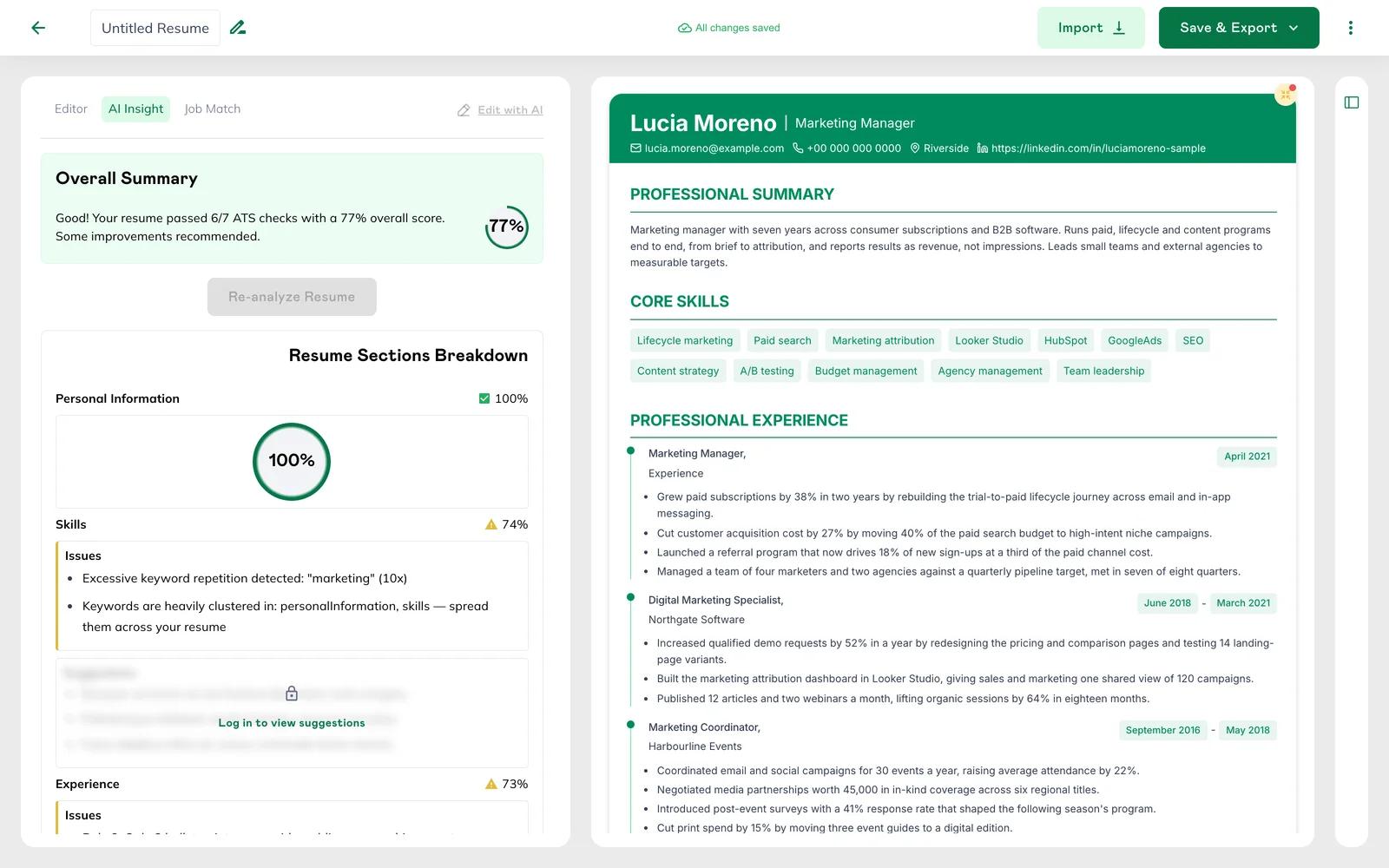
An unedited result for a fictional resume uploaded as a PDF through this page.
Overall summary
The score ring and a one-line verdict, with how many of the seven checks passed. This is the number to track as you edit.
Resume sections breakdown
Every section with its own score, and under it the issues found, the remarks about what already works, and the suggestions for what to change. Document-level findings such as page count sit with the layout check instead.
Keyword match
What was found for your field, which categories are thin, and where the wording repeats enough to read as padding.
Readability and formatting
The layout and language checks, each with its score and the specific margins, fonts, columns, sentences or phrases behind it.
Without an account you see the score, the issues and the remarks. The suggestions unlock when you log in or create a free account.
What happens after you apply
An ATS is a database that recruiters search, with rules some employers add
Most mid-size and large employers run applications through an applicant tracking system. It turns your file into a candidate profile and lets recruiters search, filter and rank those profiles. Some employers add knockout questions or automated rules to the application form. The resume itself is rarely rejected by software; a resume that parses badly or misses the search terms simply never surfaces.

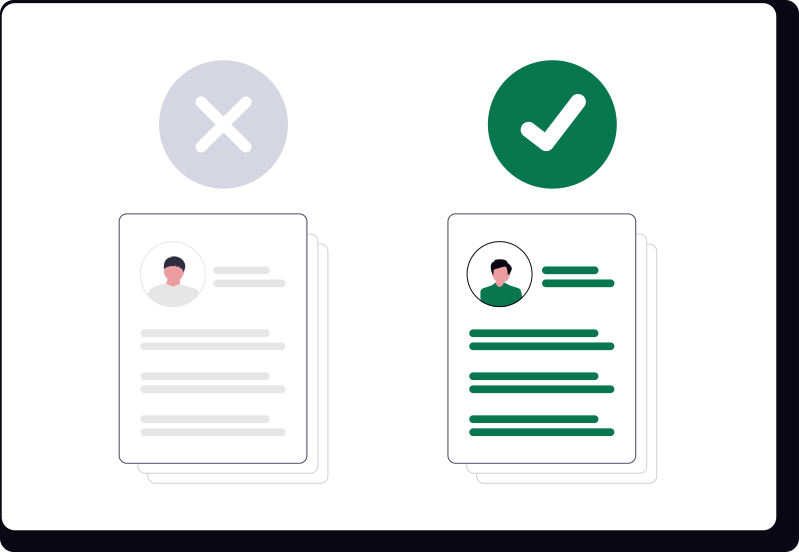
Your file is parsed into fields
The system extracts the text and sorts it into a profile: name, contact details, each role with its title, employer and dates, education, skills. Columns, tables, text boxes and graphics are where this step goes wrong.
Recruiters search and filter
Nobody reads every application. Recruiters query the database for skills, titles, credentials and years, then open the profiles that come back. A skill you have but never wrote down cannot be found.

A shortlist gets a human read
The resumes that surface are skimmed quickly for titles, dates, outcomes and consistency. Vague bullets, unexplained gaps and typos cost you here, in front of a person, not in the software.

The rest stays in the database
Resumes that parse badly or miss the search terms are usually not declined by the software. They sit unread. That is why this check scores structure and wording together, not keywords alone.
The seven checks below map onto those four moments: can the file be parsed, would a search find it, would a reader trust it, and does every section hold up.
The seven checks
Every check, what it reads and what it flags
This is the complete list, the same seven checks that run inside the editor. Each scores from 0 to 100 and passes at 70, except the keyword check, which counts for less and passes at 50 when no job description is pasted. Pick one to see what it looks at and how it can cost you points.
Bullet point impact
30% of the overall score
The largest share of the score. Every bullet under every role is read for a strong opening verb, a measurable result and active voice, because that is what a recruiter skims for once your resume surfaces.
Each achievement bullet in your experience section.
Bullets with no action verb, bullets without a single number or outcome, more than a third of them in passive voice, the same verb opening line after line, and weak verbs outnumbering strong ones. A resume with no experience section scores zero on this check.
Responsible for the monthly reports and helping the team with customer questions.
No action verb, no result, nothing a recruiter can measure.
Keyword and skill match
25% of the overall score
Whether the terms a recruiter would search for are actually in your resume, and whether you have padded them. This is the check that decides if a search finds you at all.
Your skills, experience, certifications, projects and summary against the vocabulary of your detected industry and target role. Paste a job description inside the editor and it compares against that posting instead.
Too few of the terms expected in your field, whole categories such as tools or certifications with nothing in them, one term repeated far more than the rest, the same skill listed under two spellings, and keywords crammed into a single section. Without a job description, which is the case for an upload on this page, the check carries 15% instead of 25% and passes at 50.
Skills: Excel, MS Excel, Microsoft Excel, Excel spreadsheets, advanced Excel
Five variants of one skill read as stuffing and cost points instead of earning them.
Section completeness
12% of the overall score
Whether the resume has the sections an ATS maps into a profile, and whether each entry carries the fields that profile needs. An empty field in the profile is a filter you silently fail.
Your contact details, experience, education and skills sections, and the fields inside every entry.
A missing name, email, phone or job title; no experience, education or skills section; roles without an employer or dates; degrees without an institution or field; too few skills; a single role with one or two bullets; a summary that is missing, too short or too long.
Operations Lead · 2021 to 2024
No employer and no bullets: the entry parses, but the profile it creates is nearly empty.
Layout safety
10% of the overall score
Whether the file can be parsed in reading order. On an uploaded file the check measures the real geometry of the page rather than guessing from the text.
Margins, font families and body size, column structure, the order of your sections, page count, how dense the content is, and whether there is a photo.
Margins under half an inch, more than three font families, body text smaller than ten points, three or more columns, sections out of the expected order, more than two pages, a page that is nearly empty or crammed, and a profile photo. A resume built on one of our templates is scored on the template’s column count and complexity instead.
Three-column layout with 8.5 pt body text and a photo in the header
Each of those is a separate deduction, and together they can fail the check outright.
Chronology
10% of the overall score
Whether your dates tell a consistent story: no overlaps, no future dates, newest first, and no gap or seniority claim that a recruiter would stop on.
Start and end dates on every role and degree, plus wording such as seasoned or a decade of, checked against the years those dates add up to.
Roles that overlap by more than a week, dates in the future, entries not in reverse order, dates the parser cannot read, gaps longer than three months, years claimed that the dates do not support, and a run of short tenures. Contract, freelance and intern roles are left out of the tenure signal.
Seasoned project manager with over ten years of experience · roles dated 2021 to 2024
The claim and the dates disagree, which is exactly what a recruiter notices first.
Spelling and grammar
10% of the overall score
Typos rarely stop an ATS, which is why this check weighs less, but they stop recruiters. The check is designed to read your prose and leave names, tools and acronyms alone, and it uses an English dictionary.
Your summary and bullets: spelling, grammar, style, buzzwords and readability.
Misspellings, their and there mix-ups, sentences that start with I, double spaces and doubled punctuation, informal phrasing, buzzwords with no metric or object behind them, and sentences long enough to need a second read.
Leveraged synergies to drive innovative, best-in-class, world-class outcomes.
Four buzzwords, no object and no number: flagged for stacking, not for the words themselves.
Contact integrity
3% of the overall score
The smallest weight, because a format problem here is quick to fix, but a recruiter who cannot reach you is the one outcome no score can recover.
Your email, phone number, LinkedIn URL, website and location.
An email that does not parse, a disposable or current-employer address, a phone number in a format the parser does not recognise, a LinkedIn link that is not a profile URL, a website without a scheme, and a missing or vague location.
[email protected] · linkedin.com/company/acme
A work address you may lose, and a company page where a profile link was expected.
How the score is built
One number, seven weighted checks, no mystery
Each check scores from 0 to 100 and passes at 70. The overall score is the weighted average of the seven, with the weights shown here. A check that does not apply to your resume is left out and its weight is shared across the rest. Without a job description the keyword check carries 15% rather than 25% and passes at 50, so on an upload from this page the other six shares grow in proportion.
100
seven checksBullet point impact
30%
Keyword and skill match
25%
Section completeness
12%
Layout safety
10%
Chronology
10%
Spelling and grammar
10%
Contact integrity
3%
This is MyResumeTool’s own readiness score, built from the checks above. It is not a number from any employer’s system and it does not predict an interview.
What the summary says at each level
Excellent
Nearly every check passed. Read the remaining issues and polish.
Good
Some improvements recommended. Usually one or two checks below the pass line.
Fair
Several improvements needed. Start with the heaviest check that failed.
Needs improvement
Significant revisions recommended. The breakdown shows which sections to rebuild.
A resume can score well overall and still fail one check. The report shows each check separately and counts only the checks that ran, so you always know which one it is.
Same person, two resumes
Same career, same jobs, two very different scores
Both resumes below belong to the same fictional candidate with the same roles and dates. One is laid out and written the way the checks reward. The other carries the habits they flag. The scores are real results from running each file through the checker.
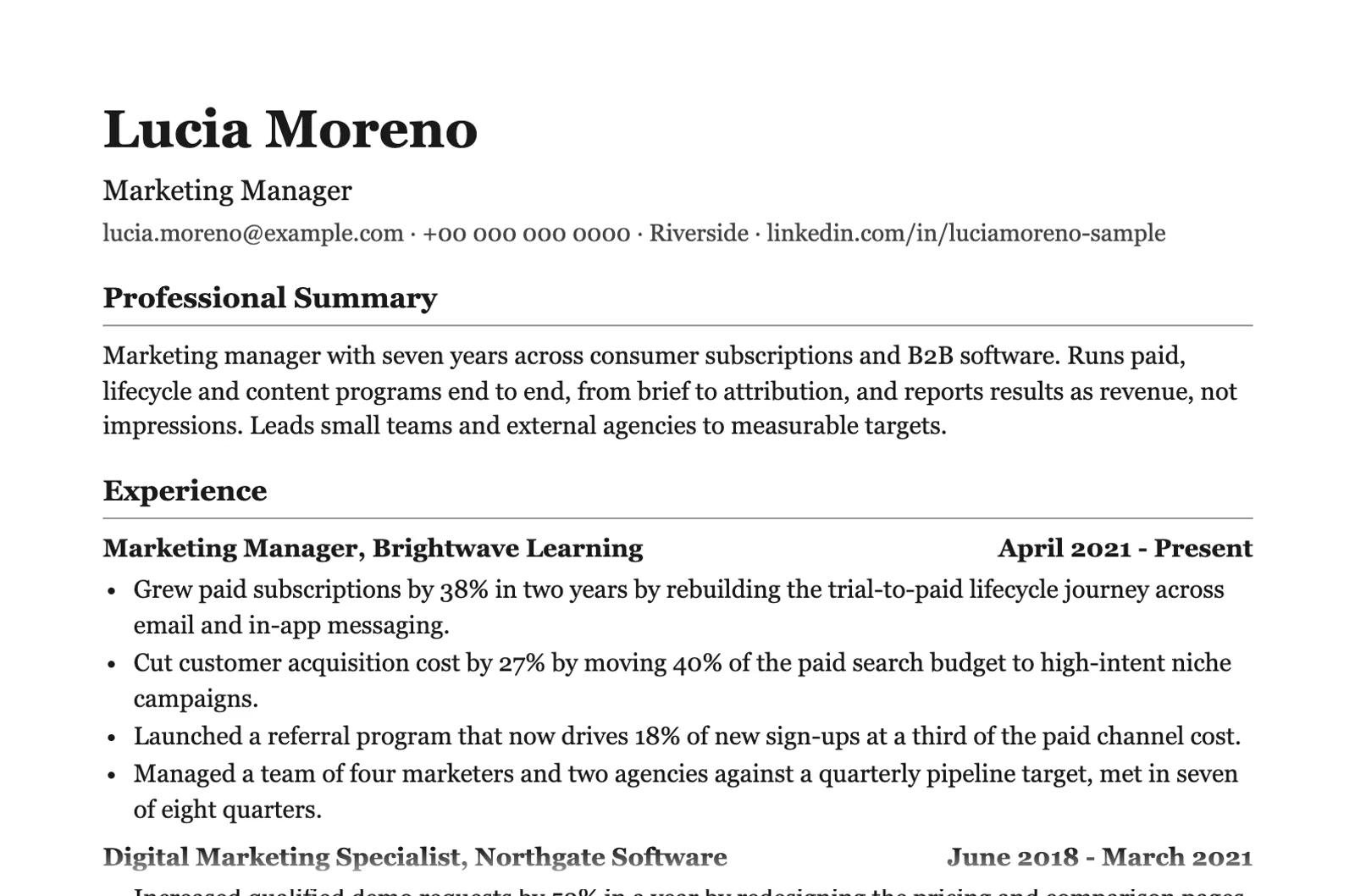
77
Overall scoreOne column, a number in every bullet
Layout scores in full: safe margins, one font family, a single column and one page.
Every bullet opens with an action verb and carries a result the reader can measure.
Contact details and personal information parse cleanly and score 100.
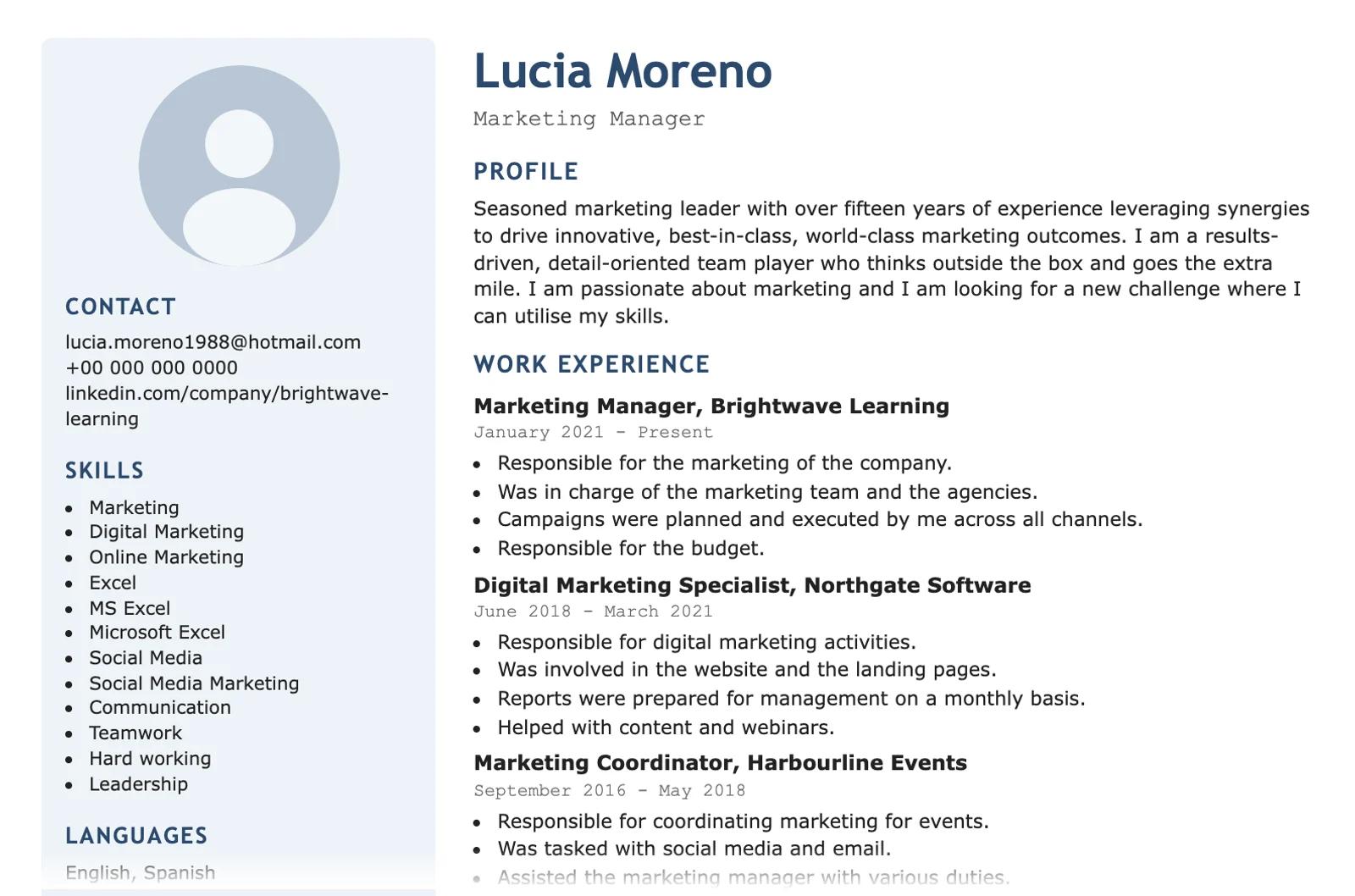
45
Overall scoreCramped layout, duty-style bullets, padded skills
Bullets describe duties in passive voice with no numbers, so the heaviest check scores 18.
Margins under half an inch, body text under ten points and sections out of order fail the layout check.
A seasoned claim against four years of dates, the same skill under three spellings and one word repeated 21 times are all flagged.
Fictional candidate and employers. Both files were uploaded through this page and scored by the same checker you get here; nothing in the reports was edited.
Common mistakes
Nine habits that cost points, and how the checker spots each one
None of these is a myth or a guess. Each one maps to a specific deduction in one of the seven checks, and each one appears in the report under the check that found it.
A photo on the resume
Parsers cannot read a face, and many templates misplace the text around it. The layout check deducts for a profile photo on the resume you build or import into the editor; a picture embedded in an uploaded file is not always detected, so remove it yourself.
Running past two pages
One or two pages earns full marks for length. A third page takes most of the page-length points, whatever is on it.
Three columns or a busy sidebar
One column is read in order. Two columns are tolerated. Three or more scramble the reading order and take most of the column points.
Tiny body text to fit more in
Body text under ten points caps the font score, and so does mixing more than three font families. Cut words instead of point sizes.
Dates that overlap or sit in the future
Two full-time roles overlapping by more than a week, an end date next year, or roles out of order each count against the chronology check.
Seasoned, with three years of dates
Words such as seasoned, veteran and a decade of are compared with the years your dates add up to. When they disagree, the claim is flagged.
The wrong email address
A disposable address, your current employer’s domain, or a LinkedIn link that points at a company page instead of your profile each take contact points.
Bullets with no numbers
Quantified results carry the biggest share of the heaviest check. A role described only as duties scores low however impressive the work was.
The same keyword fifteen times
Repeating a term far beyond the rest, listing a skill under several spellings, or piling keywords into one section reads as stuffing and lowers the keyword score.
From score to fixed resume
Fix what it found without leaving the editor
The report sits beside your resume, so every issue is a short step from the section it names. Change it yourself, or let the AI propose edits for the wording issues it can address.
Open the issue
Each flagged item names its check and section, and shows the excerpt when the checker could pin it to your text. Expand it and the problem is in front of you, not somewhere in the file.
Edit it, or let the AI propose fixes
Type the fix into the field, or use Fix Analysis Issues to have the AI propose edits for the wording the report flagged. The AI does not touch layout, section structure, contact details or dates. Those stay yours to change.
Review, then run it again
Every proposed change opens beside the previous version and nothing is saved until you accept it. Review each edit, then run the analysis again to see the new score and what is left.
The analysis is part of the free account. The AI fix for flagged issues is part of the paid plans, and whether you can run the analysis again after editing depends on your plan.
Two checks, one order
ATS check first, job match before each application
The ATS check reads your resume on its own
Does it parse, is it complete, do the dates hold up, is the wording strong, are the right terms for your field present? Run it after you build or import, and again after a big edit.
The job match reads it against one posting
Which requirements do you show evidence for, which are missing, and what capped the score? Run it for each application, once the resume itself is in good shape.
What it will not do
What the check will not do
A score is only useful if you know its limits. These are the four that matter.
It does not predict a hiring decision
It estimates how well your resume parses, reads and holds together. Interviews depend on the role, the market and the people, none of which a score can see.
It does not add anything to your resume
The report lists issues; you decide what to change. The optional AI fix proposes edits for the flagged wording and shows you every change before anything is saved.
It does not reward keyword stuffing
The keyword check penalises repetition, duplicate skill spellings and keywords piled into one section. Padding lowers the score; evidence in your bullets raises it.
Your file is kept only as long as it is needed
The upload becomes a resume in your account, or in a browser-session draft if you have none, and is kept under the retention rules in the privacy policy.
Read the retention policyFiles it reads
Upload the file you already have
The parser behind the check is the same one that imports resumes into the editor, so what it reads here is what you get to edit. Applicant tracking systems differ, so treat the extracted fields and the issues as a diagnostic, not a guarantee that every employer’s system reads the file the same way.
Columns are read in order where detected
The parser looks for a second column and reads it after the first, so dates and locations on the right are kept out of your bullets. Narrow sidebars of short lines can still be merged into the main text, so review the imported fields.
Scanned files get text recognition
A scanned PDF, a PNG or a JPG goes through text recognition before the checks run. Recognition can miss or reorder content, so a real text PDF or DOCX will always parse more precisely.
Headings in your own words
Work history, employment, career summary, about me: the parser maps dozens of heading variants to the standard sections, so you do not have to rename them first.
Who it is for
Run it before the application that matters
Applying online for the first time in years
Your resume was written for people, not a parser. See whether it survives the import before you send it to fifty portals.
Getting no replies
If applications go unanswered, start with the file rather than the market. The report shows what a search would miss and what a reader would stop on.
Career changers
The keyword check scores you against the vocabulary of the field you are moving into, so you learn which terms you still need to earn and show.
Resume writers checking a draft
Run a client’s draft through the same seven checks before you hand it over, and send the report with it.
Questions about the ATS check
Frequently asked questions
An applicant tracking system is the software employers use to collect applications, parse resumes into candidate profiles, and let recruiters search, filter and rank them. Most mid-size and large employers use one. It stores and sorts; the decisions are made by the people searching it.
Sometimes, but not by reading the resume. Employers can add knockout questions or automated rules to the application form, and those can decline an application. The resume file itself is seldom rejected by software. The common failure is quieter: the file parses badly or lacks the terms recruiters search for, so it is never surfaced. The checker scores exactly those two things, parsing safety and findable, well-written content.
In this report, 75 and above reads as Good and 90 and above as Excellent. Below 60 the summary recommends significant revisions. Each check passes at 70, except the keyword check, which passes at 50 when no job description is pasted, so a resume can score well overall and still fail one check; the breakdown tells you which.
Yes. Upload here and the analysis runs as part of the import, with no account. The analysis is also included in the free account inside the editor. The AI fix for flagged issues is part of the paid plans. See the plans
Not to see your score, the issues and the remarks. The suggestions are blurred until you log in or create a free account, and you need an account to download the resume. An anonymous import is kept as a browser-session draft and moves into your account when you sign up.
PDF, DOCX, DOC, RTF, PNG and JPG, up to the size shown in the upload box. Images and scanned PDFs go through text recognition before the checks run.
Modern systems parse both. What matters more is the layout inside the file: one column, standard headings, real text rather than text inside images, and margins and fonts a parser can read. The layout check measures those on your file, whichever format you upload.
The ATS check reads your resume on its own: structure, completeness, dates, wording and the keywords expected in your field. The job match compares your resume with one pasted posting and scores the evidence for each requirement. Run the ATS check first, then the job match for each application.
No. It reports. Your content is carried into the editor as written. If you choose Fix Analysis Issues, the AI proposes edits for the flagged wording and opens them beside the original for you to accept or discard.
There is no standard ATS score. Every checker picks its own checks and weights, and most do not publish them. Ours are on this page: seven checks, the weights shown above, each passing at 70, or 50 for the keyword check without a job description. Compare the issues between tools, not the number.
Check your resume before the next application
Upload it, read the checks that ran, fix the highest-impact issues in the free editor, and apply with fewer parsing risks and a clearer list of what to review.
No file to upload? Create a resume for free