Free job match check for your resume
See how well your resume matches the job before you apply
Upload your resume and paste the posting. You get a match score, the skills you already show, the requirements you do not, and the evidence behind each one, so you know what to fix before you press apply.
No account needed
Nothing is added to your resume
Every score shows its evidence
1. Upload your resume
2. Paste the job description
Why the match matters
Recruiters read for what the posting names
A posting is a list of requirements, and most screening starts by searching applications for them. A resume that is strong in general but silent on the named skills, credentials or years reads as a miss, however good the work behind it was. Knowing the match before you apply turns that into a fixable list.
76.4%
of recruiters surveyed search and rank candidates by the skills in the job description, ahead of education, job title or years of experience.
Jobscan, ATS Usage Report88%
of employers say qualified candidates are screened out because they do not match the exact criteria in the job description.
Harvard Business School, Hidden Workers: Untapped Talent (2021)5
areas every check scores separately: skills and tools, experience, responsibilities, education and credentials, and seniority.
How the job match on this page worksSame role, two resumes
Both are good resumes. Only one answers the posting.
Two fictional postings, each with one requirement marked as key, and two fictional resumes for each with similar experience. Read the key requirement, then look for the line that proves it. The highlighted line is the one the check found, or the closest line it could find.
Backend Engineer, Payments Platform
Harbourline Payments · fictional example
Requirements
- Key requirement
Production experience with RethinkDB, including changefeeds
- Required qualification
Five or more years building backend services in Node.js or Go
- Required qualification
Experience operating services on AWS with on-call responsibility
- Preferred qualification
Payments, ledgers or other money-moving systems
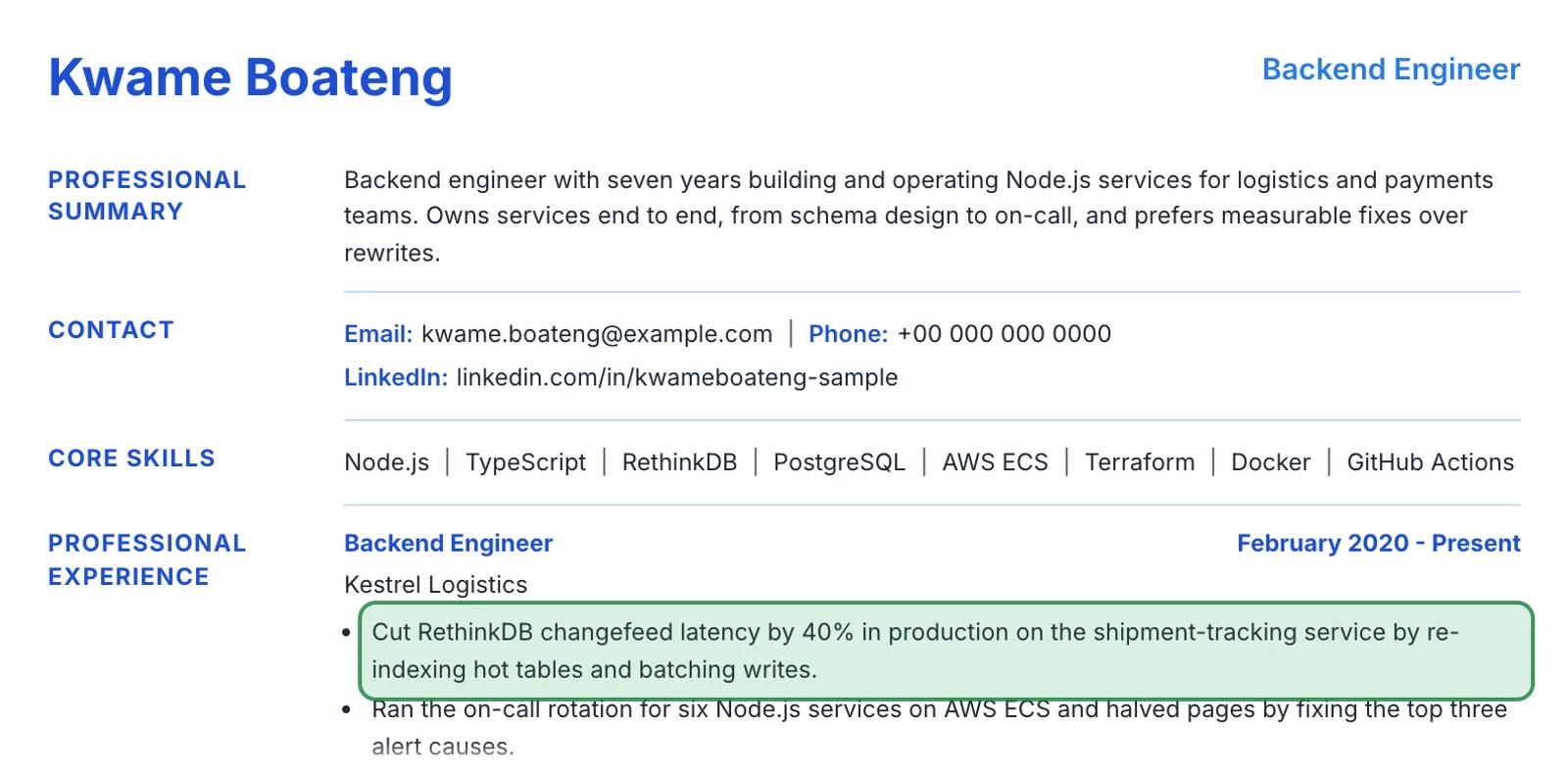
Kwame Boateng, Backend Engineer
WHAT THE CHECK SAYS ABOUT THE KEY REQUIREMENTRethinkDB and its changefeeds are named in an achievement with an outcome, inside a dated role. The requirement counts as matched and drops out of the list of what held the score back.
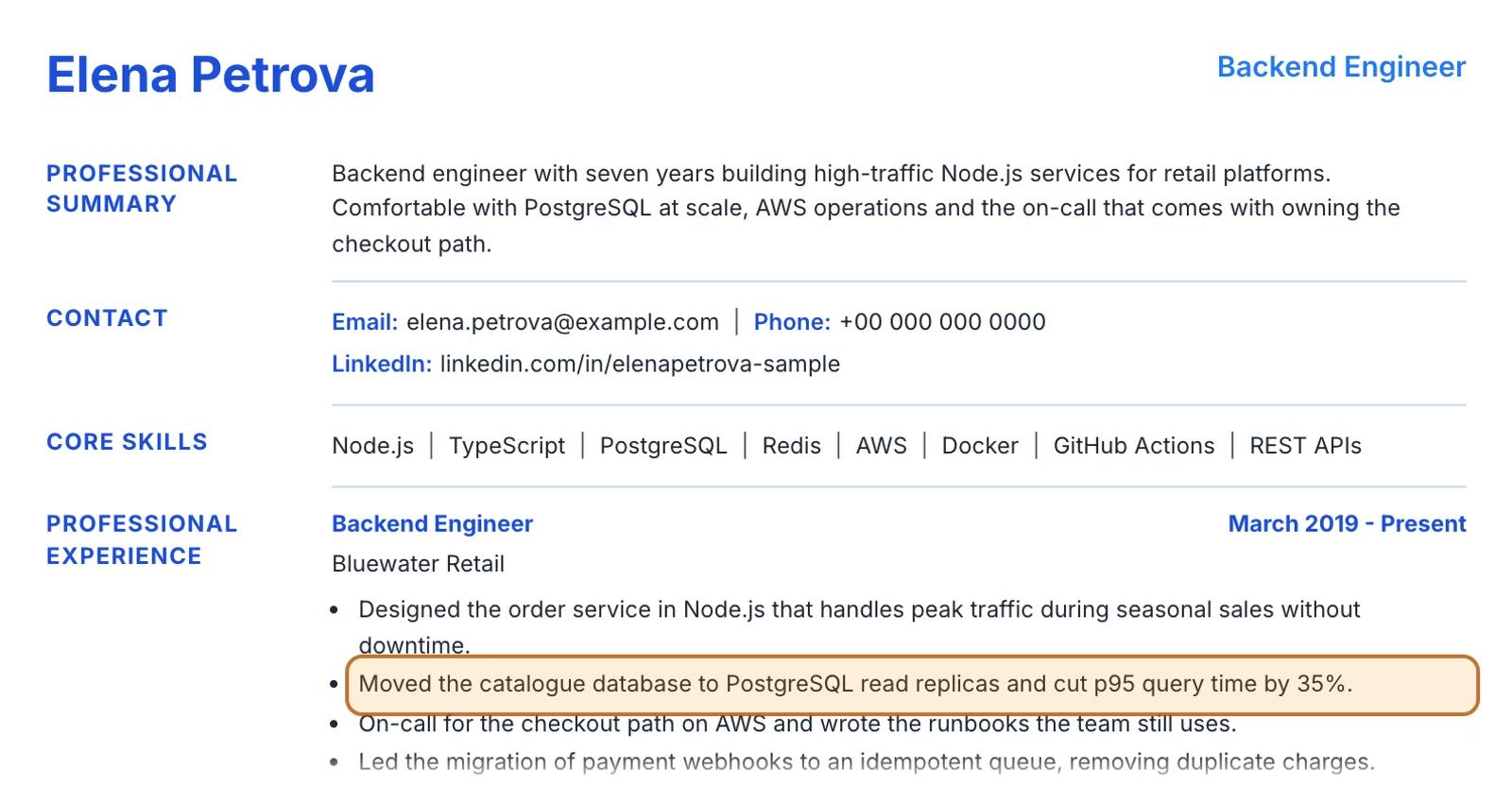
Elena Petrova, Backend Engineer
WHAT THE CHECK SAYS ABOUT THE KEY REQUIREMENTResume B never names RethinkDB. The check lists the requirement under what held the score back and leaves the gap visible instead of guessing from the PostgreSQL work.
Resume B is not the weaker resume. Against a posting that asks for PostgreSQL and high-traffic Node.js, the result would flip. Neither candidate should add a tool they have not used. The point is to pick the posting your evidence answers, or to surface evidence you forgot to write down.
How to read your result
Every number comes with the evidence behind it
The result is built to be checked, not just believed. Each part answers one question about your resume and the posting.
Job match result
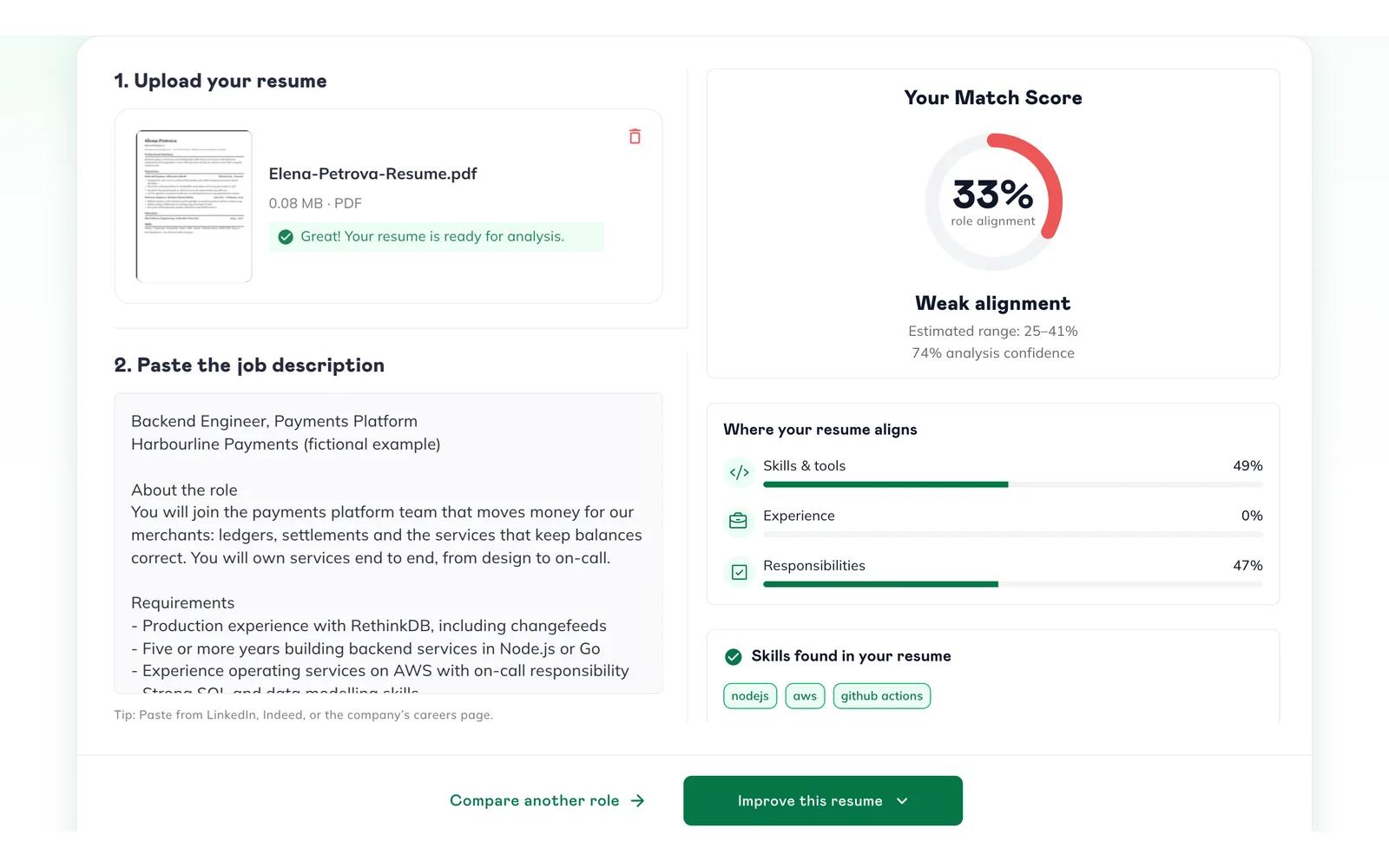
A real result for the fictional Resume B checked against the fictional posting above.
The match score and its range
One number for the whole posting, with an estimated range. A narrow range means the posting and the resume gave the check plenty to work with. A wide one means read the detail before trusting the number.
Five areas, scored separately
Skills and tools, experience, responsibilities, education and credentials, and seniority. A posting that never mentions a credential simply has no bar for it.
Skills found in your resume
The posting’s skills that your resume supports, so you can see what is already working before you change anything.
Skills to review before applying
The posting’s skills with no clear evidence in your resume. Some you have and forgot to write down. Some you do not have, and the honest move is to leave them out.
What held the score back
The requirements that cost the most, each with the posting’s own wording and the strength of evidence found, so you can decide what to fix first.
The eligibility notice
When a posting calls a licence, registration or credential mandatory and your resume does not show it, the score is capped and the result says so plainly. No rewording fixes that one.
Job match check versus ATS analysis
Two different checks, two different questions
The ATS analysis looks at your resume on its own. The job match looks at your resume next to one posting. A resume can pass the first and still miss the second, and the other way round, so the editor offers both.
What you want to know
Job match check
ATS analysis
The question it answers
Does this resume answer this posting?
Is this resume complete, readable and well structured on its own?
What it reads
Your resume and one job description, side by side.
Your resume alone, with your target role as the only outside reference.
What it scores
Five areas drawn from the posting: skills and tools, experience, responsibilities, education and credentials, seniority.
Seven checks on the document: layout, section completeness, contact details, chronology, keyword match, bullet impact, spelling and grammar.
What you get back
A match score with its range, the skills found and the skills to review, the requirements that held the score back, and an eligibility notice when a mandatory credential is missing.
An overall score, a per-section breakdown, a keyword list and a readability report, each with the specific issues found.
When to run it
Before each application, once per posting.
After you build or import a resume, and again after a big edit.
What it changes
Nothing. It reports, and the editor’s alignment tools work only from evidence already in your resume.
Nothing by itself. Its fix action proposes edits for the wording an issue points to, and you accept or discard each change.
Where to find it
Free on this page without an account. Inside the editor on the paid plans.
Inside the editor from a free account. The first analysis runs automatically after an import; running it again depends on your plan.
Use them in that order. The ATS analysis makes the resume easy to read and complete. The job match makes it answer the posting in front of you.
See how the ATS check worksHow to tell if your resume matches a job
The check you can do with a highlighter
The tool does this for every requirement at once, but the method is simple enough to do by hand, and knowing it makes the result easier to act on.
Pull the requirements out of the posting
Named tools, credentials, years, and the responsibilities under the role summary. Skip the company blurb. Mark which ones say required and which say preferred.
Find the line that proves each one
Not the skills list. The achievement line, the dated role, the certificate. If you cannot point at a line, the posting’s reader cannot either.
Weigh the proof
An outcome inside a dated role counts most. A word in a skills list counts a little. A mention in the summary counts less. A mandatory credential that is absent counts against everything else.
Decide: reword, add evidence, or move on
Use the posting’s terms where they are true of what you did. Add the evidence you forgot. Where you have none, leave the gap and decide whether the role is still worth your application.
Where the evidence sits
The same skill counts differently depending on where it appears
Take one posting term, Kubernetes. Here is how the check treats three resumes that all contain it.
In an achievement, inside a dated role
“Moved 14 services to Kubernetes and cut deploy time from 40 minutes to 6.”
In the skills list
“Docker, Kubernetes, Terraform, GitHub Actions”
In the summary only
“Cloud-native engineer familiar with Kubernetes.”
This is why two resumes with the same skills list can score differently, and why the fastest improvement is usually moving a true claim from the list into the role where you used it, with the result it produced.
What the check will not do
It tells you the truth about the match, then leaves the next move to you
A match score is only useful if you can trust what sits behind it. These are the rules the check keeps.
It never adds a skill to your resume
The result lists what is missing. Nothing is written into your resume unless you write it, or you ask the editor’s AI to work from evidence you already have.
A gap stays a gap
When a requirement has no evidence, it is shown as a gap with the posting’s own words. It is not softened into vague phrasing to lift the score.
It estimates fit, not outcomes
The score compares your resume with one posting. It does not know the other applicants, the hiring manager or the budget, and it does not predict interviews.
Your file is used for the check
The upload is processed to run the comparison and, if you choose, to open the resume in the editor. How long files are kept is described in the privacy policy.
Read the retention policyFrom score to resume
Fix the gaps from your own evidence, then check again
A low score is a to-do list, not a verdict. Open the resume in the editor with the posting attached and work through what held the score back.
Open it in the editor
After a check, choose Improve this resume. The resume and the posting travel with you into the free editor, so nothing is retyped.
Bring the evidence forward
Edit by hand, or ask the AI to improve alignment. It reorders and rewords from what your resume already says, asks when it needs a fact, and shows every change for you to accept or discard. AI alignment inside the editor is part of the paid plans.
Check again, then keep a copy per application
Run the match again until the gaps left are the ones you cannot honestly close. Duplicate the resume with the next posting and repeat. The original stays untouched.
Who uses it
Built for the moment before you press apply
Career changers
Your experience is real but named differently. The check shows which requirements your evidence already covers and which words the posting uses for them.
Teaching to learning design, finance to analytics, nursing to health informatics
Experienced applicants
Fifteen years produces more evidence than one page can hold. The gap list tells you which lines earn their place for this posting.
Senior engineers, managers, consultants, clinicians
Applying to several similar roles
Two postings with the same title rarely ask for the same things. Check each one and keep a tailored copy per application.
Developers, marketers, analysts, project managers
Deciding whether to apply at all
If the gaps are mandatory credentials, you know before you spend an evening on a cover letter. If they are wording, you know that too.
Licensed roles, regulated industries, senior titles
Questions about the job match
Frequently asked questions
Yes. Upload a resume, paste a posting and read the full result without an account. The number of free checks is limited per day and shown under the checker. Inside the resume editor, repeated analysis and AI alignment are part of the paid plans. See the plans
Not for the check. You need a free account to keep the resume in the editor and download it after you make changes.
A requirement from the posting is matched when your resume contains evidence for it: the same tool, credential, responsibility or years, ideally inside a dated role. Related words count less than the posting’s own terms, and a mention in the summary counts less than an outcome in an achievement.
The posting names a licence, registration or similar credential as mandatory and your resume does not clearly show it. The result caps the overall score so a strong skills match cannot hide a requirement that would end the application.
Because the score is about the posting’s requirements, not the title. A backend role that asks for one database scores your resume on that database. Another with the same title and a different stack scores the same resume differently.
No. It reads your resume and reports. If you continue into the editor, you decide every change, and the AI there works only from evidence already in your resume.
It is a different check. An ATS analysis looks at the resume on its own: structure, sections, wording and readability. The job match compares the resume with one specific posting. The editor offers both.
PDF, DOCX, DOC, RTF and PNG or JPG images. Images go through text recognition, so a clean PDF or DOCX gives the most reliable reading.
Check the resume you have against the job you want
A couple of minutes, no account. Then fix what the result shows, from your own evidence.
Prefer it rewritten with you, line by line? See the AI resume writer